Home › On Wear OS
A water reminder built for Wear OS
Tile, complication, notification actions and an on-watch model — HydroPulse does its thinking on the wrist, so the reminder arrives where your hands already are.
Why the watch is the right place for this
Hydration fails on friction. The gap between “I should drink” and a logged glass is usually a phone in another room, and by the time you find it the moment has gone. A wrist notification with a Log water button closes that gap to one tap.
The watch is also the only device that knows how hard you are working. Heart rate and exercise state come from the sensors on your arm, so the estimate is built from live physiology rather than from a step count synced hours later.
Most hydration apps in the Play Store are phone apps that ship a watch face complication as an afterthought. HydroPulse is a Wear OS app: the model, the ledger and the database live on the watch, and it keeps working when your phone is not nearby.
What HydroPulse does here
- A swipe-away tile showing your current balance without opening anything.
- A watch-face complication, as a ranged value or short text.
- Notifications with Log water and Snooze 15 min as direct actions.
- Room database and profile stored on the watch, so history survives a lost phone connection.
- Wear OS 3.0 and later: Pixel Watch, Galaxy Watch 4 and newer, TicWatch and others.
How HydroPulse decides
- You enter your weight, age and sweat profile once. That sets your personal baseline loss — the water you lose just by being alive and breathing.
- The watch reads your heart rate continuously and converts it into a heart-rate-reserve fraction: how hard you are working relative to your own resting and maximum heart rate, not to an average person's.
- Local temperature and humidity are fetched anonymously and turned into a heat-index multiplier, because the same effort costs far more fluid at 33 °C and 70 % humidity than at 18 °C.
- Every drink you log is credited back to the ledger. When the running balance crosses your threshold, HydroPulse tells you — with a specific millilitre amount and the reason behind it.
What to expect
Install it on the watch, set your weight and units once, and grant heart rate, activity and coarse location when asked — each one feeds a specific part of the model, and the app still works without them using sensible defaults. Battery cost is small: passive heart-rate monitoring and a periodic background check, with weather cached for 30 minutes.
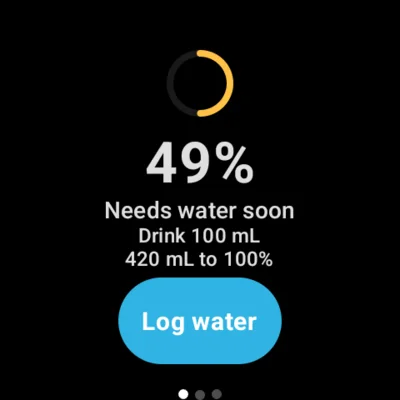
Your balance as a dial, with the amount to drink now. 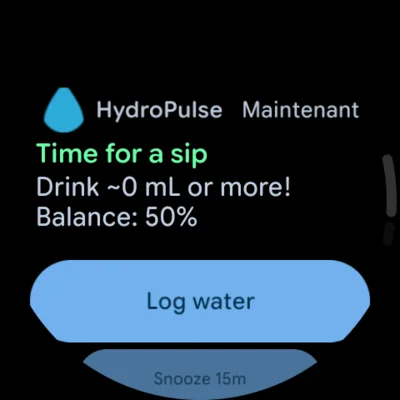
One tap to log, one to snooze — the phone stays in your pocket.

Wear OS 3.0+. One-time purchase — no subscription, no ads, no account. The app interface is in English.
Common questions
Do I need my phone with me?
No. The model, the ledger and the water log all run on the watch. A phone is only involved in the initial install, and the weather lookup uses whatever connection the watch has.
Which watches does it work on?
Any Wear OS 3.0 or newer watch with Google Play services — Pixel Watch, Galaxy Watch 4 and later, TicWatch and comparable devices. Heart-rate accuracy varies by device, and the model degrades gracefully if a sensor is unavailable.
Is there a phone app?
No, and that is deliberate. Everything you need is on the watch, which is also why there is nothing to sync and no account to create.
How much battery does it use?
It uses passive Health Services monitoring rather than a continuous high-rate sensor stream, checks in periodically through WorkManager, and caches weather for 30 minutes. In normal use it is a background app, not a workout tracker.
Where the model comes from
The baseline draws on IOM and EFSA adequate-intake figures, the sweat-rate component on ACSM exercise-hydration guidance, and the environmental multiplier on the US National Weather Service heat-index formula. These are population references adapted to what a watch can actually sense — a well-founded estimate, not a laboratory measurement.
Not a medical device
HydroPulse produces an estimate, not a measurement. It is a wellness tool, not a medical device, and it does not diagnose, treat or monitor dehydration or any other condition. If you take diuretics, restrict fluid on medical advice, or have a kidney, heart or endocrine condition, follow your clinician's intake guidance rather than this app's. Seek urgent care for confusion, fainting, or heat illness.
Private by design
Your heart rate, activity and drink log never leave the watch. There is no account, no advertising SDK and no product analytics — nothing tracks what you do in the app. Two things do leave the device: a pair of coordinates to a public weather service, with no identifier attached, and a crash report if the app fails. Neither carries your health data.
More on hydration
- Running & trainingSweat-rate-aware reminders for runs, rides and gym sessions.
- Hot weatherWhen heat and humidity raise your needs, the reminders move first.
- At workFor desk days where six hours vanish between two glasses.
- How much per dayWhere the 2-litre rule comes from, and why your number is not that.
- Signs of dehydrationWhat mild dehydration actually feels like — and when it stops being mild.
- Heart rate & hydrationThe link between cardiac drift, effort and fluid loss.